What Does FLAC Stand For? Free Lossless Audio Codec Guide
By ytmp3converter • July 29, 2026
Quick Answer (Featured Snippet / AI Summary):
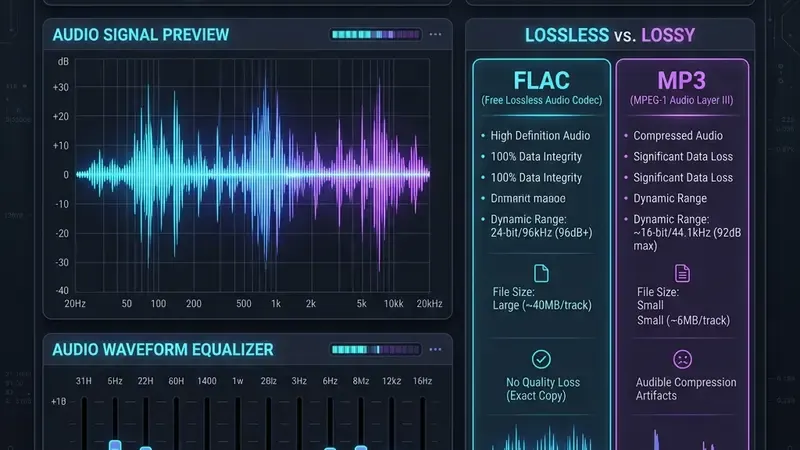
FLAC stands for Free Lossless Audio Codec. It is an open-source digital audio format that compresses sound files without discarding any acoustic data. Unlike lossy formats such as MP3, FLAC preserves 100% of the original studio recording quality while reducing file size by 30% to 50% compared to uncompressed WAV files.
FLAC stands for Free Lossless Audio Codec. It preserves the audio samples supplied to the encoder; it does not restore information missing from a lossy source.
If you have ever wondered what is flac or why audiophiles talk about .flac audio files like they are holy relics, this guide breaks down everything in plain English. No jargon, no sales pitch, just honest technical answers and practical advice.
Table of Contents
- What Does FLAC Stand For?
- What Is FLAC Audio Format & How Lossless Compression Works
- What Is a FLAC Audio File & File Type Characteristics
- FLAC and ALAC Comparison (Open Source vs. Apple)
- FLAC To MP3 Conversion: When and Why to Convert
- Frequently Asked Questions (FAQ)
What Does FLAC Stand For?
FLAC stands for Free Lossless Audio Codec. It was created by Josh Coalson in 2000 and developed under the royalty-free Xiph.Org Foundation.
Let’s break down the four words in the acronym:
- Free: The format is completely open-source and royalty-free. Anyone can build software or hardware that plays or encodes FLAC files without paying licensing fees.
- Lossless: No audio data is deleted during compression. When a FLAC file plays, the decoder reconstructs the exact digital sound wave recorded in the studio.
- Audio: The format is strictly designed for sound streams, music tracks, voice recordings, and podcasts.
- Codec: Short for coder-decoder. It refers to the algorithm that compresses raw audio into a file and decodes it back into sound during playback.
When people ask what format is flac, the simplest explanation is that it acts like a ZIP file designed specifically for sound. When you put a text document into a ZIP archive, you don’t lose any letters when you extract it. FLAC does that exact same thing for digital sound waves.
What Is FLAC Audio Format & How Lossless Compression Works
Understanding what is flac audio format requires looking at how digital sound is recorded.
Standard compact disc (CD) audio uses uncompressed Linear Pulse-Code Modulation (LPCM) saved inside .wav or .aiff containers. Uncompressed CD audio streams at 1,411 kilobits per second (kbps). That takes up roughly 10 megabytes of storage space for every single minute of music.
+-----------------------------------------------------------------------+
| Uncompressed CD Audio (WAV)  -->  1,411 kbps  --> ~10 MB per minute    |
+-----------------------------------------------------------------------+
| FLAC Lossless Compression    -->  700–1,000 kbps --> ~5 MB per minute   |
+-----------------------------------------------------------------------+
| MP3 Lossy Compression        -->  128–320 kbps  --> ~1 MB per minute   |
+-----------------------------------------------------------------------+
When you examine what is flac audio, the magic lies in its mathematical prediction algorithm. Instead of storing every single raw acoustic sample, FLAC analyzes recurring mathematical patterns in the sound wave and stores the difference (the residual data).
This mathematical trick shrinks the file by 30% to 50% without deleting a single frequency or harmonic detail.
Lossy vs. Lossless Audio Compression
To understand what is a flac format, compare it directly to lossy compression formats like MP3 or AAC:
- Lossy Compression (MP3, AAC, OGG): These codecs use psychoacoustic modeling. They permanently remove frequencies human ears supposedly cannot hear easily, such as quiet sounds playing at the exact same moment as loud sounds.
- Lossless Compression (FLAC, ALAC, WAV): These codecs preserve 100% of the original audio data. Nothing is deleted, masked, or discarded.
Nine times out of ten, if you are listening to music through $15 plastic earbuds while running on a noisy treadmill, you won’t hear the difference between a 320 kbps MP3 and a FLAC file. But on proper studio monitors or high-resolution home stereos, FLAC provides greater dynamic range, sharper acoustic separation, and zero compression distortion.
For more details on optimizing bitrates across different codecs, check our detailed guide on best audio quality settings.
What Is a FLAC Audio File & File Type Characteristics
When you see a file ending in .flac on your computer, you are looking at a .flac container. If someone asks you what is flac file or what is flac file type, here are the technical specifications that define it:
- File Extension:
.flac - MIME Type:
audio/flacoraudio/x-flac - Bit Depth Support: Supports 4-bit up to 32-bit per sample (24-bit studio audio is standard).
- Sampling Rate Support: Supports 1 Hz up to 655,350 Hz (CD quality is 44.1 kHz, while Hi-Res audio is 96 kHz or 192 kHz).
- Channel Configurations: Supports mono, stereo, and 5.1 surround sound configurations.
- Metadata Container: Uses Vorbis Comments to store ID3 track metadata, album artwork, lyrics, artist names, and track numbers.
Understanding what is a flac audio file also means knowing where it is supported. Today, native FLAC playback works out of the box on Windows 10/11, macOS, Android, Linux, VLC Media Player, and most modern smart TVs and home theater receivers.
If you frequently work with various audio containers across different operating systems, read our comprehensive overview on how online audio file converters work.
FLAC and ALAC Comparison (Open Source vs. Apple)
When exploring what is a flac file, you will inevitably encounter Apple’s alternative: ALAC (Apple Lossless Audio Codec).
Both formats provide identical, byte-for-byte bit-perfect sound quality. However, they differ in licensing history and native ecosystem support. Here is a direct FLAC and ALAC comparison:
| Feature / Metric | FLAC (Free Lossless Audio Codec) | ALAC (Apple Lossless Audio Codec) |
|---|---|---|
| Developer | Josh Coalson / Xiph.Org Foundation | Apple Inc. |
| Licensing | Open-source, royalty-free | Originally proprietary, open-sourced in 2011 |
| File Extension | .flac | .m4a or .caf |
| Compression Savings | 30% to 50% of uncompressed size | 40% to 50% of uncompressed size |
| Native Operating Systems | Windows, Android, Linux, macOS | macOS, iOS, iPadOS, watchOS |
| Hardware Compatibility | Hi-Fi receivers, Android phones, car stereos | iPhone, Apple Watch, HomePod, Mac |
| Metadata Standard | Vorbis Comments | MP4 / iTunes ID3 Tags |
If you live entirely inside the Apple ecosystem (iPhone, Mac, Apple Music), ALAC fits naturally into native apps. If you use Android, Windows, Linux, or dedicated digital audio players (DAPs), FLAC is the universal standard.
For a deeper dive into Apple container formats, see our article explaining how to convert YouTube videos to M4A.
FLAC To MP3 Conversion: When and Why to Convert
While FLAC is ideal for archiving original studio albums, there are times when FLAC to MP3 conversion is necessary.
Here is why you might convert a .flac file to MP3:
- Saving Storage Space: A 50 MB FLAC file shrinks down to about 8 MB when converted to a 320 kbps MP3. That frees up 80% of your mobile storage space.
- Legacy Hardware Compatibility: Older car stereos, standalone MP3 players, and older DJ controllers often cannot decode
.flacfiles. - Broad Device Support: MP3 plays on literally every device manufactured since 1995.
+-------------------------------------------------------------------------+
| Original FLAC File (50 MB)  -->  High-Resolution Studio Archival Master |
+-------------------------------------------------------------------------+
                                    |
                        [Online Audio Converter]
                                    |
                                    v
+-------------------------------------------------------------------------+
| Target MP3 File (8 MB)    -->  Universal Playback on Any Device/Car     |
+-------------------------------------------------------------------------+
How to Convert FLAC to MP3
To perform a clean conversion using a reliable browser tool:
- Open an online media tool like our audio file converter.
- Upload your
.flacfile. - Select MP3 as your target output format.
- Choose a high bitrate like 320 kbps to maintain optimum listening quality.
- Click Convert and download your finished
.mp3track.
To learn more about extracting audio streams from video sources, check our guide on how to convert YouTube videos to audio and our analysis on whether YouTube supports WAV files. Official standards and specifications for open media web integration can also be reviewed at the World Wide Web Consortium (W3C).
Frequently Asked Questions (FAQ)
What does FLAC stand for in digital audio?
FLAC stands for Free Lossless Audio Codec. It is an open-source audio encoding format designed to reduce file sizes by 30% to 50% without discarding any acoustic data or degrading original sound quality.
Is FLAC audio better than MP3?
Yes, FLAC provides higher sound quality than MP3 because it is a lossless format. MP3 discards subtle audio details to achieve tiny file sizes, whereas FLAC preserves 100% of the original studio recording data.
Can iPhones play .flac audio files natively?
Modern iPhones running recent iOS versions can play FLAC files through the Files app or third-party media players like VLC. However, Apple’s native Music app historically preferred ALAC (Apple Lossless Audio Codec).
What is the difference between FLAC and ALAC?
FLAC is an open-source, royalty-free lossless format widely supported across Windows, Android, and Linux. ALAC is Apple’s proprietary lossless codec optimized for the Apple ecosystem, though both offer identical acoustic quality.
Why would someone convert FLAC to MP3?
Converting FLAC to 320 kbps MP3 reduces file size by up to 80%, freeing up mobile storage while ensuring total playback compatibility with older car stereos, legacy media players, and basic Bluetooth speakers.
Does converting MP3 to FLAC restore lost audio quality?
No. MP3 is a lossy format that has already permanently deleted audio frequencies. Converting an MP3 file to FLAC creates a much larger file, but it cannot recreate the missing original studio detail.